How AI Optimizer works
AI Optimizer gives you one local point where OpenAI-powered traffic can be observed, cached, and routed more efficiently.
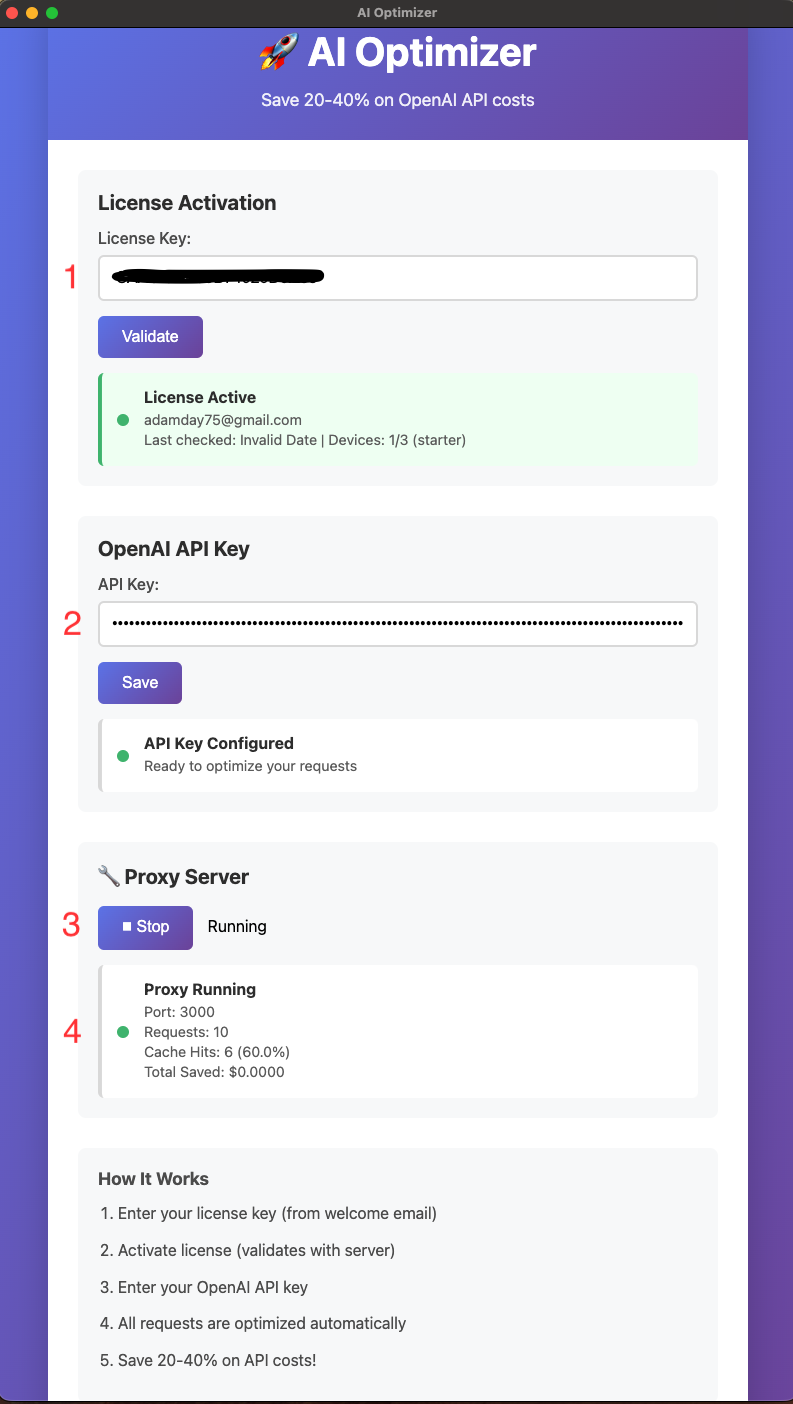
1. Enter your license
Paste in the license from your welcome email and activate the app on your machine.
2. Add your OpenAI API key
Save your API key so AI Optimizer can route and cache OpenAI-powered requests locally.
3. Start the local proxy
Once the proxy is running, AI Optimizer listens on http://localhost:3000/v1.
4. Point your workflow at the local base URL
In many setups, the main change is updating your OpenAI base URL so traffic flows through AI Optimizer first.
5. Watch requests and cache hits update
The app shows request totals, cache hits, and hit rate so you can confirm the optimizer is working while you use your normal workflow.
Typical config change
For many OpenAI-compatible tools, the practical change is using AI Optimizer as the local base URL:
OPENAI_BASE_URL=http://localhost:3000/v1That lets your workflow hit the local optimizer first instead of going directly to OpenAI every time.